|
MacEase |
|
|
More Info on These and Other Highly Rated Utilities
Other Reviews Parallel to USB Printer Adapter
General Tips PCI Cards --
An Easy and Inexpensive Way to Expand the Power of Your
Mac Powerful Protection For Your Mac |
Photo All-In-One Ink
Jet Printer
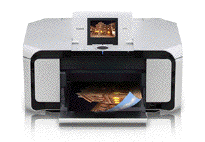
Company: Canon Overview At 18.5" W x 15.6" D x 8.4" H (with the trays retracted) the MP970 isn't compact, but it's a reasonable size considering that the unit includes a second paper tray, a mechanism for performing duplex printing, a scanner, and a flip-up LCD display. Also built into the MP970 are Ethernet, PictBridge, and USB ports and multiple card slots. Additionally, an optional Bluetooth adapter is available. The CD supplied with the printer includes a printer driver, photo editing software, and a basic OCR program. The MP970 uses six ink cartridges (including a special black ink cartridge) when printing in color. Additionally, the printer has a separate black ink cartridge for printing black text.
The Good There's a lot to like about this all-in-one printer. It prints text and photos quickly and the performance of the scanner is quite snappy. The built-in LCD monitor is bright and clear, and the controls for using the printer are reasonably intuitive and quite versatile. The MP970's versatility is further enhanced by the myriad port and card slot options that are included with the printer. The printer's driver is easy to use, and it includes lots of printing and scanning options. Also, during my testing the printer seemed to sip rather than gulp ink; the printer's ink-status display indicated most of the cartridges were nearly full after printing dozens of pages of text and dozens of photos. As has been my experience with most of Canon's printers, the MP970 is a quiet printer and has not shown a tendency to clog its print head. The Not So Good While Canon includes a good feature set with the printer and the printer provides snappy performance, the quality of the printer's output is inconsistent. This is especially troublesome because the MP970 is Canon's top consumer photo all-in-one printer, and it's on the expensive side. Although printed text during my testing has consistently looked very good (for an ink jet printer), scanned and printed photos have produced inconsistent results. While some scans have produced impressively sharp and detailed images and prints, other scans have not. And while color fidelity on some scans has been reasonably good, others have been quite disappointing. Unfortunately, the same inconsistency applies to printed photos; while image detail was very good, color fidelity was inconsistent. Although printed photos always looked quite nice, they often differed significantly from the original image. In fact, my old Canon iP4000 4-color photo ink jet printer produced prints with better color fidelity than the (much) more expensive 6-color MP970! Conclusion There's a lot to like about this all-in-one printer: It has loads of useful features, easy-to-use controls and software, and very fast performance. And when consistent color fidelity is not a critical consideration, I find myself preferring to use the MP970 over my other color printers. However, as a 6-color printer at the top of Canon's all-in-one photo printer line, I feel Canon needs to do a better job providing its customer's with consistent top-quality results. Pros: Produces fast and very good output (for a photo printer) when printing text; fast scanner; fast photo printing; includes a built-in duplex printing mechanism and a second paper tray; the black and the color print heads can be cleaned separately; includes printed manuals; ink cartridges can be changed individually; easy-to-use controls and software; comes with one year of toll free support. Cons: Printed photos have inconsistent color fidelity; scans have inconsistent color fidelity and are not always sharp; Ethernet setup instructions need some work; somewhat expensive.  PrintMagic, Print It! and WebPrint Plus can more than double the life of your ink cartridges.
© 2008 by Steve Becker. All rights reserved. |