|
MacEase |
|
|
More Info on These and Other Highly Rated Utilities
Other Reviews Canon PIXMA Pro9000 Photo Printer Parallel to USB Printer Adapter
General Tips PCI Cards --
An Easy and Inexpensive Way to Expand the Power of Your
Mac Powerful Protection For Your Mac |
by Steve Becker
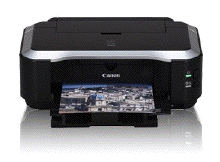
Company: Canon Overview I've been testing and using Canon photo printers for a number of years, and I've been favorably impressed during this time by their reliability, speed, quality of output, and cost of operation. Since the iP4600 represents the latest evolution of Canon's consumer photo printer line, I fully expected to find a printer that built upon the quality and success of Canon's earlier models; unfortunately, this is not the case.
The Results While the iP4600 does provide snappy performance and does include an impressive feature set for a printer in its price range (individual color ink tanks, multiple paper input options, duplex printing, a PictBridge port, etc.), it falls short in a very important area: output quality. Perhaps the new inks that Canon is using with this printer are part of the problem. But whatever the reason, prints produced by the iP4600 look relatively pale and washed out (I tested the iP4600 with many types of photo paper). Configuring the printer's driver for its "Vivid" setting improved things considerably, but results still weren't nearly as good as the results obtained from other printers that had been configured with their default settings. On the positive side, the iP4600 does a nice job printing fine details, and its ability to print with tiny one picoliter droplets means that photos are virtually grain free on glossy paper. Unfortunately, the printer's fast output and ability to print the fine detail in photos don't resolve the issue with producing prints that appear pale and washed out.
The Bottom Line The iP4600's feature set and speed are attractive attributes at the printer's price point, but this is trumped by disappointing output quality.
Pros: The printer is fast and quiet, the black and the color print heads can be cleaned separately, the ink cartridges can be changed individually, and it comes with one year of toll free support. Cons: Color prints appear relatively pale with washed out colors.  PrintMagic, Print It! and WebPrint Plus can more than double the life of your ink cartridges. © 2009 by Steve Becker. All rights reserved. |