|
MacEase |
|
|
More Info on These and Other Highly Rated Utilities
Other Reviews Parallel to USB Printer Adapter
General Tips PCI Cards --
An Easy and Inexpensive Way to Expand the Power of Your
Mac Powerful Protection For Your Mac |
by Steve Becker
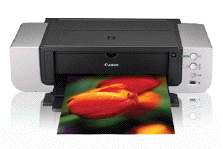
Company: Canon Overview The Pro9000 8-color photo printer has been on the market for several years (an unusually long time for an ink jet printer). This may at least partially explain why it has a larger footprint (26.0" W x 7.6" H x 14.0" D) than some of its newer and more svelte wide-format competition. However, neither of these factors should dissuade you from considering buying this excellent photo printer.
Impressive Results While this printer doesn't offer the card slots and network connectivity that are increasingly common on newer printers, it does provide impressively fast and consistently beautiful output. In fact, at its (default) "Top Quality Setting," the Pro9000 yields 8.5 x 11 prints in about 1 minute and 13 x 19 prints in just over 2 minutes. As good as these print times are, they would be meaningless if it wasn't for the impressive quality of the prints produced by the Pro9000. At its default settings, the printer consistently produces prints with richly saturated colors, a wide color gamut (thanks to its large number of ink tanks), and lovely detail. Configuring the printer's driver for its highest quality setting more than doubles the time it takes to generate a print but makes only a barely perceptible improvement in print quality with most of my test images. The only criticism I have with the printer's output is that sometimes the color fidelity is off with some shades of red. On the other hand, I didn't see any color cast on my black & white test image, something that is a problem with many other photo ink jet printers.
Additional Info The Pro9000 uses 8 separate ink tanks, so you can replace depleted ink tanks individually, thus saving money. However, the Pro9000 uses the same size tanks that are used by Canon's standard format photo printers, so 13 x 19 prints deplete the ink tanks rather quickly. The printer has a Direct Print Port and a USB 2.0 Port (a cable is not included with the printer). The Pro9000 can be used with Canon's standard range of photo papers, but it's also designed to work with premium specialty papers such as Canon's Fine Art papers. In addition to a standard paper tray, the Pro9000 offers a front feeder for heavyweight papers. As is standard with most of Canon's photo ink jet printers, this printer is easy to set up. Further, Canon's driver is easy to configure, reliable, and provides for being able to separately clean the printer's color and black ink nozzles. However, over the years I've found Canon's ink jet printers are very resistant to developing clogged nozzles. Still, it's nice to know this feature is available should it ever be needed.
The Bottom Line This is one terrific, albeit expensive, photo printer. While the PIXMA Pro9000 may lack some of the "bells and whistles" of some other printers, it's a great, reliable, and easy-to-use photo printer which produces reliably beautiful prints on a wide range of paper types and sizes.
Pros: Produces fast output with excellent quality; prints on up to 13 x 19 paper; prints on Fine Art as well as on regular photo paper; the black and the color print heads can be cleaned separately; includes a printed manual; ink cartridges can be changed individually; easy-to-use controls and software; comes with one year of toll free support. Cons: Expensive; cartridges get used up quickly when making 13 x 19 prints; color fidelity inconsistent with some shades of red.  (4.5 out of a possible 5) PrintMagic, Print It! and WebPrint Plus can more than double the life of your ink cartridges. © 2009 by Steve Becker. All rights reserved. |