 |
MacEase |
|
|
More Info on These and Other Highly Rated Utilities
Other Reviews Canon MP970 All-In-One Photo Printer Parallel to USB Printer Adapter
General Tips PCI Cards --
An Easy and Inexpensive Way to Expand the Power of Your
Mac Powerful Protection For Your Mac |
by Steve Becker
Company: Intego Overview An unfortunate reality is that as use of the Internet has grown and always-on broadband connections have proliferated, security issues related to the use of the Internet have skyrocketed. The average computer user easily can be overwhelmed by both the breadth and the depth of security issues related to using a computer over a network connection. While there is no single solution for all of these security issues, Intego's NetBarrier is designed to provide an integrated approach that addresses many of the most common security concerns. If you have turned on the firewall that's built into OS X and/or you are using a router with a built-in firewall, you already have a significant level of protection against many common types of security intrusions. However, NetBarrier provides a highly-configurable and user-friendly interface for its firewall while also integrating many other security-related functions into its program.* Comparing NetBarrier X4 With NetBarrier X5 Since most of the comments in my review of NetBarrier X4 also pertain to NetBarrier X5, this review will focus just on the major differences between the two programs. First off, NetBarrier X5 has a revised interface, though its functionality is essentially the same as it was in version X4. New enhancements to the program's main window include direct access to setting the configuration for the firewall and buttons at the bottom of the window for quickly accessing additional elements of the program. 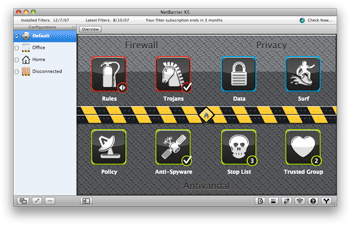 NetBarrier's main window provides quick access to most of the program's main functions. New features in X5 include multiple firewall configuration settings that can change when network settings or locations are changed, both simple and advanced firewall modes, new options for intrusion protection, improved anti- spyware functions, better logging, and enhanced network monitoring features. Additionally, a new helper application, Washing Machine, has been added which cleans browser caches, cookie files, history files, and more. Conclusion In practice, NetBarrier X5 does have more useful options and features than X4 and its spyware protection has been updated, making an already excellent program even better. If you currently are using NetBarrier X4, you will have to decide whether you are willing to pay the $34.95 for the additional protection and refinements that are afforded by the upgrade. However, if you currently aren't using security software that includes the protection provided by NetBarrier X5, I highly recommend that you either buy the program or try the free 30-day demo version of NetBarrier X5!
Pros: Good interface; easy-to-configure; provides comprehensive protection and features; highly customizable; has no apparent affect on system performance; good value at $49.95. Cons: Some default settings leave critical protective features turned off.  4.5 out of a possible 5 Print It! and MacMagic can more than double the life of your ink cartridges and let you instantly mine just the information you want from any program and from the Internet! * It's highly recommended that you use an antivirus program along with a firewall/security program.
© 2008 by Steve Becker. All rights reserved. |
